MCP & data-egress security
How AgentData secures the MCP surface and controls what data leaves the organisation. This page is written for security reviews of regulated or sensitive deployments (e.g. financial institutions and healthcare).
TL;DR
- Query results never reach the LLM. The LLM only plans a query from metadata; the SQL runs locally; result rows return straight to the caller. The execution path makes zero LLM calls.
- MCP is fail-closed. With authentication required, the
/mcp/endpoint returns401without a valid per-user API key or OAuth 2.1 token. Every call is tenant-scoped and audit-logged. - Zero external egress is achievable. Run the LLM on-prem (Ollama/vLLM) or via AWS Bedrock over VPC PrivateLink. A per-tenant policy can hard-block any cloud egress.
1. Transport & deployment
- HTTPS only. For sensitive clients, deploy all services on-prem (backend, UI, MCP) behind the customer firewall — nothing needs inbound access from outside.
- The on-prem connector is outbound-poll-only: it opens no inbound port, polls the backend over HTTPS, and runs queries locally. Database credentials and raw rows stay on-prem.
2. Authentication & authorisation
- Per-user API keys (issued in the UI) or OAuth 2.1 + PKCE (for claude.ai / ChatGPT web connectors).
- With
REQUIRE_AUTHenabled,/mcp/fails closed (HTTP 401) without a valid credential. The legacy shared key is optional, not required. - Every credential is scoped to one tenant (
client_id); all data access is tenant-isolated. - Role-based access control: super_admin / admin / editor / viewer — see Roles & access.
3. What data flows where
This is the part that matters most for a review:
| Path | Reaches the LLM? | Notes |
|---|---|---|
| Query results / rows | No | SQL runs locally; rows return to the caller. |
| Query planning (NL → query) | Metadata only | Question text + entity/field names + saved-query examples. |
| Discovery / classification | Schema only | Column names, types and stats — never cell values. |
| Prospecting (Apollo/Hunter) | Company names | By design; can be disabled per tenant. |
| Embeddings (optional) | Question text | Optional; can be local or disabled. |
The LLM backend is pluggable:
anthropic— Anthropic cloud.openai+base_url— on-prem Ollama / vLLM / LM Studio → no external egress.bedrock— AWS Bedrock; use a VPC PrivateLink endpoint to stay inside the customer's AWS.
GET /api/meta reports the active backend and whether it egresses.
4. Per-tenant data-egress policy
Each tenant has a data-egress policy (default: full cloud, i.e. today's behaviour). Manage it under Admin → Security, or via PUT /api/meta/security:
allow_llm_egress— whenfalse, the backend refuses any LLM or embeddings call that would leave the organisation. No data egresses; AI features then require an on-prem LLM.allow_prospecting— whenfalse, blocks Apollo/Hunter prospecting (HTTP 403).discovery_samples— explicit lock on the schema-only guarantee.egress_allowlist— an optional list of external hostnames the org may reach for AI/prospecting. When set, a cloud LLM call to any host not on the list is blocked — defence in depth on top of the toggle.
The Security panel shows an effective banner: "Data egress: NONE" (on-prem or blocked) vs "EXTERNAL LLM active" (cloud provider with egress allowed).
5. Attack prevention
-
Per-key scopes — each MCP API key carries a subset of
read/query/flows. A read-only connector can list and describe but cannot run queries or flows. Scopes are chosen at key creation in the Connect panel.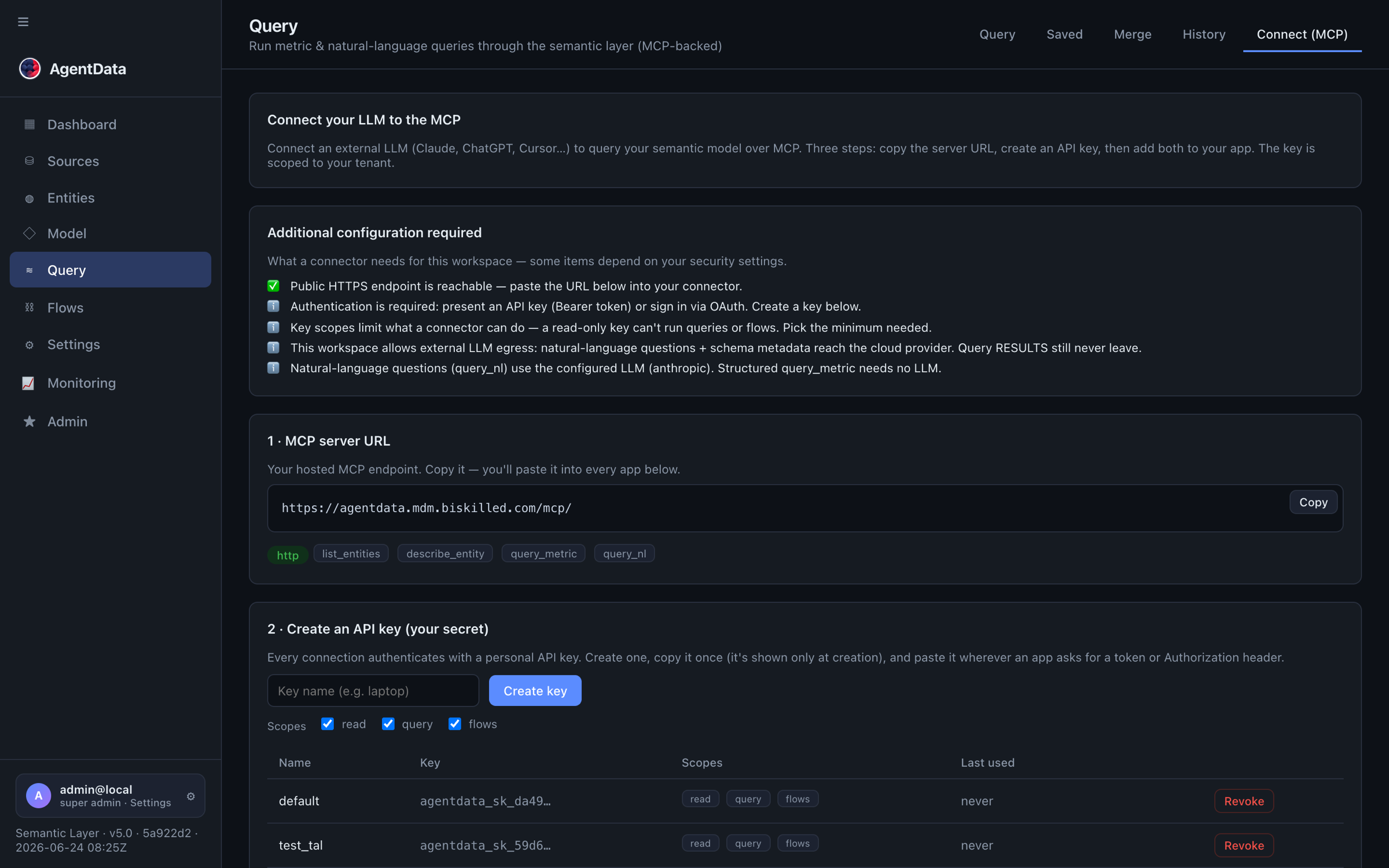
-
Brute-force lockout — too many bad bearer tokens from one client IP within a window lock that IP out (fail-closed, HTTP 429) until it backs off.
-
Rate limiting — on heavy or abusable endpoints, keyed per tenant.
-
Fail-closed auth — no anonymous MCP access when authentication is required.
-
Audit log — every MCP tool call is recorded (user, tool, time, row count, status, client app). Failed-auth and lockout events are logged separately.
-
Tenant isolation — prevents cross-tenant data access even with a valid key.
6. Monitoring (admin)
- MCP traffic monitor (Admin → MCP traffic) — per-connector and per-user call volume, error rate, active keys with their scopes, failed-auth / lockout events, recent calls, and anomaly flags. Admins see their own tenant; super-admins see all.
- Flow runs / logs — the Monitoring view.
- LLM usage & cost — recorded per user, model, tokens and cost.
7. Recommended posture for a regulated client
- Deploy all services on-prem.
- Use an on-prem LLM (
openaiprovider +base_url) — or Bedrock over PrivateLink. - Set the tenant policy:
allow_llm_egress=false(belt-and-braces),allow_prospecting=false, and optionally anegress_allowlistpinning the only permitted AI host. - Require authentication; issue least-privilege per-user keys (read-only where possible); review Admin → MCP traffic and Monitoring regularly.
Result: no business data leaves the organisation — query results never go to the LLM, and with an on-prem LLM even questions and metadata stay in-org.